|
|
|
|
|
|
|
 |
|
|
| Rotate GRAPH x axis |
Submitted by Keith Culotta, Computer Dimensions, Inc.
Sometimes the GRAPH command will produce a graph with an overcrowded x axis. This routine takes the graph and rotates the x axis labels so they will not overlap.
Create the Graph and pass a pointer to it as the first parameter of the method. The labels will be rotated 22.5 degrees unless another number is passed as the second parameter.
C_PICTURE(MyGraph)
GRAPH ( MyGraph ; graphNumber | graphSettings ; xLabels {; yElements} {; yElements2 ; ... ; yElementsN} )
Graph_Pic_RotateXLabels(->MyGraph {;rotate degree} )
// ----------------------------------------------------
// Keith, 8/10/2017, 09:49:29
// ----------------------------------------------------
// Method: Graph_Pic_RotateXLabels
// -
// INPUT1: Pointer - to SVG Picture from the Graph command
// {INPUT2}: Real - degrees to rotate (90 is vertical; 22.5 is Default)
// OUTPUT: None - INPUT1 is changed
// ----------------------------------------------------
$Options:=SVG_Get_options
$Options:=$Options ?- 6 //silence the beep on err
SVG_SET_OPTIONS ($Options)
C_POINTER($picPtr;$1)
C_REAL($rotate;$2)
C_LONGINT($x;$y;$maxW;$w;$h)
$picPtr:=$1
If (Count parameters>1)
$rotate:=$2
Else
$rotate:=22.5
End if
$svg:=SVG_Open_picture ($picPtr->)
$ref:=SVG_Find_ID ($svg;"ID_x_values") // this is the x labels group
If ($ref="")
$ref:=SVG_Find_ID ($svg;"ID_x$value") // debug inspired by v16R4 - this is where it beeped
End if
If ($ref#"")
ARRAY TEXT($aRef;0)
SVG_ELEMENTS_TO_ARRAYS ($ref;->$aRef) // get all the x labels
$size:=Size of array($aRef)
For ($i;1;$size)
SVG_SET_ATTRIBUTES ($aRef{$i};"text-anchor";"start") // they were middle
$tmpS:=SVG_New // get the size of this label
$refT:=SVG_Add_object ($tmpS;$aRef{$i})
SVG_SET_XY ($refT;0;0)
$tmpP:=SVG_Export_to_picture ($tmpS)
PICTURE PROPERTIES($tmpP;$w;$h)
SVG_CLEAR ($tmpS)
$maxW:=Choose($maxW<$w;$w;$maxW)
DOM GET XML ATTRIBUTE BY NAME($aRef{$i};"x";$x)
DOM GET XML ATTRIBUTE BY NAME($aRef{$i};"y";$y)
$x:=$x-$h // shift to taste
$y:=$y-$h
SVG_SET_XY ($aRef{$i};$x;$y)
SVG_ROTATION_CENTERED ($aRef{$i};$rotate)
End for
DOM GET XML ATTRIBUTE BY NAME($svg;"viewBox";$refT)
ARRAY TEXT($aCoord;0)
Parse_TextToArray ($refT;->$aCoord;" ")
$x:=Num($aCoord{1}) // shift labels left
$y:=Num($aCoord{2})
$w:=Num($aCoord{3})
$h:=Num($aCoord{4})+($maxW*2) // guess
SVG_SET_VIEWBOX ($svg;$x;$y;$w;$h) // rotated labels make the picture taller
$picPtr->:=SVG_Export_to_picture ($svg)
End if
SVG_CLEAR ($svg) |

|
 Submit a Tip Archive Submit a Tip Archive |
|
|
|
|
|
|
| Active4D 64-bit |
 Active4D is now available for 4D v12 64-bit Server! Take full advantage of your 64-bit hardware with the power of Active4D.
 |
|
|
|
Suggest a Spotlight
|
|
|
|
|
|
|
This weekend, we asked you...
|
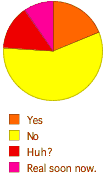
| Do you have succession plans with your key customers? |
|
Your vote: (no vote)
Total votes received: 21
Survey submitted by David Eddy
|
|
|
|
Suggest a Survey
|
|
|
|
|


